Samsung Jitterbug J Easy Cellphone Review
Big Button Cell Phone from Greatcall
With Optional Urgent Response Service
The Samsung Jitterbug J helps seniors who want a phone that makes it easy to call family and friends and has an urgent response service for safety. This review will walk you through how to set up and use this big button cell phone from GreatCall.
Note: This phone is no longer sold by Greatcall, but they do still support service on it if you pick up a used one.
Update: A red version that supports the Go Red for Women campaign was available (now replaced by the Jitterbug5)
Ordering the Jitterbug J
The Jitterbug J costs $99. If you order online, you get a free car charger.
You choose
- the color of your phone,
- how much you want to pay per month,
- any additional services such as LiveNurse or the Daily Check-In Call, and
- any additional accessories such as a wireless Bluetooth headset.
Getting the Phone
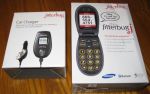
The phone and car charger come in one box but are packaged separately.
Once you open the box containing the Jitterbug J, you simply insert the battery into the back of the phone and press the ON/OFF button for a couple of seconds to turn it on.
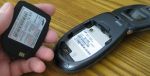
Pre-Activated Phone
When you receive the phone, it is already set up with a phone number and is ready to use.
Make a Call
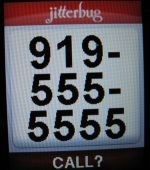
To make a call on your Jitterbug J, dial the area code and phone number and press the "Yes" button. Note that the phone number display is nice and large.
Big Button Cell Phone
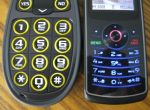
Easy to Press Buttons
The Samsung Jitterbug J is definitely a big button cell phone. Here's another picture comparing the keypad of this phone with that of a standard cell phone.
Readable Screen
The screen is also bigger. The solid colors combined with black and white letters also make it easy to decipher.
When you open the phone, you can choose between Phone Info, Phone Settings, and Phone Book.
Phone Info
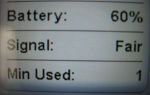
Open your Jitterbug J phone and scroll through your menu and select Phone Info.
There you'll see you phone number again, how much battery charge is left, how strong your signal is, and (roughly) how many minutes you have used.
It's all pretty straight-forward except for the minutes used.
Minutes Used
The display of the number of minutes used can be a little misleading because it counts all calls, even those that don't pick up on the other end.
To test the phone when I first got it, I called my home phone to see that it was working fine. My home phone rang, and then I ended the call. When I checked my Phone Info, I saw that it said
"Min Used: 1"
This got me quite annoyed, and I immediately called . . .
Customer Service
Phone Number
You can call Jitterbug Customer Service at
1-800-733-6632.
So I called and waited for about four or five minutes, steaming all the while. After all, if I was going to be charged a minute for every unanswered call, my minutes were going to disappear fast.
All's Well that Ends Well
I spoke to a nice lady who informed me that the one minute was NOT counted against my monthly airtime.
Whew! With that settled let's go back to checking out the J's settings.
Phone Settings
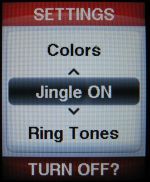
Through the Phone Settings menu you can
- select your ringtones,
- turn off the Jingle,
- choose your colors, and
- set up your Bluetooth headset.
Ringtones
You can select from a set of ringtones ranging from the Jitterbug (yes, the actual Jitterbug dance music), to a music box, and, ironically, a rotary phone ring. Personally, I like the ringtone called Espresso.
Jingle
The Jingle is the musical flourish that greets you when you turn your phone on or off. You can silence that Jingle here. If you usually leave your phone on, you won't hear it that often anyway.
Similarly, you can adjust the . . .
Colors
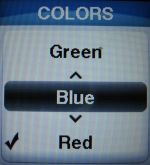
You can choose the color scheme for your Jitterbug J's display. The default is red, but you can change it to blue, black, green, or gray.
Bluetooth
If you are going to use a Bluetooth headset, you can set it up here. You have to turn Bluetooth "on" and then pair your headset with the phone.
Phone Book
You use the up and down buttons to scroll through the people in your phone book. The display of the name and number is nice and clear. If you have a lot of people in your phone book, it can take a while to scroll through everyone.
There doesn't appear to be a shortcut where you can enter the first letter of someone's name and jump to all the names starting with that letter. The solution to this is to add the voice-activated dialing feature (free) so that you can just say the name of the person you want to call.
Adding Names
You add people to your phone book by clicking "Add" and then entering the name and phone number in the usual tedious way. But it's not the only way. You can also do it online!
MyCalendar
You can keep track of your birthdays and appointments with the Jitterbug phone calendar service. You can enter one-time appointments like an unscheduled visit to the doctor or recurring ones such as birthdays and or visits to the salon.
You enter appointments online or through the Jitterbug MyOperator, which does cost you airtime.
My GreatCall
You can set up an online GreatCall account. Using the account, you can add people to your phone book, add events to your calendar, check how many minutes you have really used, and see a copy of your Jitterbug bill.
Sign Up
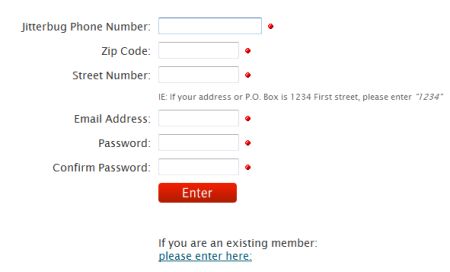
Go to http://www.mygreatcall.com to be directed to the online account page.
Online Phone Book
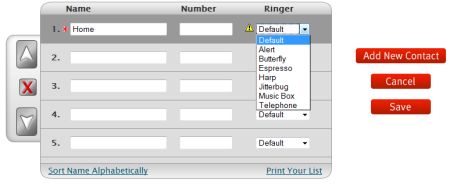
Click on the Phone Book to see the people currently in your phone. You can easily add people to your phone book, and you even get to choose a ringtone for each person in your phone book.
This feature is also great if you are buying this phone for someone else who doesn't want to spend the time configuring their phone book. You can create your online account and create the phone book for them so it'll always be easy for them to call their friends and family. You could also check if they have enough minutes. So you've seen two different ways to set up your Jitterbug J's phone book and how easy it is to press the big buttons on this cell phone, but you may be thinking, "What if I don't want to press any buttons at all?"
Voice-Activated Dialing
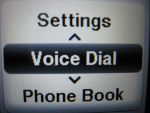
Voice-activated dialing is available on this phone. It was a free service from Jitterbug, but you have to call customer service to set it up.
Voicemail and Call History
Voicemail and Call History are two more extras that are not initially available. However, you can add them to your Jitterbug J by calling customer support. Adding your call history feature is free, but voicemail costs an extra $3 a month. It's probably worth it though.
Usage
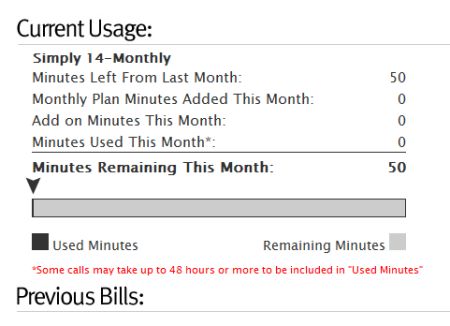
The Usage section shows you how many minutes you've used and how many minutes you have left for the month.
Bill
You can see a copy of the last few bills in the MyBill section. Unfortunately, at this time, you cannot pay your bill online. You have to mail them a check or set up auto-pay from your credit card. I prefer paying by check.
Good Phone
Overall, I found only a couple of complaints with the Jitterbug phone. All in all, the Samsung Jitterbug J is a really good phone that's easy to use allows anyone to easily keep in touch with their family and friends.