Straight Talk Voicemail
How you access Straight Talk Voicemail varies depending on the phone you have because it could be on any one of four networks - AT&T or T-Mobile (both GSM), Verizon or Sprint (both CDMA). The instructions are given on phone support pages. Once you get to that page, click on the "Learn More" link for your phone model, and then click on Messaging and then Voicemail. You should see an interactive tutorial for how to access voicemail for your specific phone.
For example, here are the voicemail instructions for the Samsung Galaxy Precedent.
When Straight Talk first launched, all their phones were on the Verizon network, so the rest of the instructions below apply to those CDMA phone like the Samsung R355c and LG290C. These instructions won't work for phones on the AT&T, T-Mobile or Sprint networks.
Setting Up Voicemail
For Straight Talk phones on Verizon Network
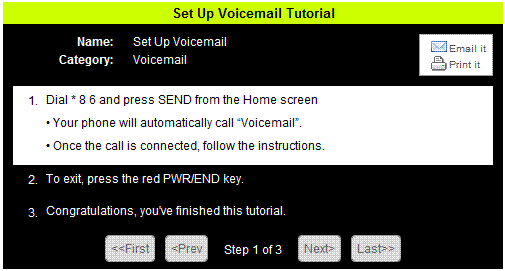
Some phones already have voicemail as a menu item in the phone, and all you need to do is choose it to call voicemail and follow the setup instructions. For the other phones, all you have to do is . . .
Dial * 8 6
To set up your voicemail, all you have to do is dial * 8 6 from your phone and follow the instructions.
Press the Red PWR/End key when you’re done to hang up.
Accessing Voicemail
Once you have set it up, you access your voicemail in the same way by dialing * 8 6 or the voicemail menu option.
Note: Some old phones like the Straight Talk Razr, have a voicemail menu option but it may not be set up yet. So you have to change the number setting to * 8 6 so that it works properly.
Checking your voicemail will cost your airtime, but since Straight Talk plans include a lot of minutes, it’s not a big deal.
Checking Voicemail from a Landline
You should be able to use checking your voicemail from a landline:
- Dial your own number.
- Wait until you hear your greeting, then
- Press the “#” button.
- Enter your Password PIN if you have one.