Home
About Me
Tracfone
Straight Talk
Net10
Free Phone
Consumer Celllular
Alltel Prepaid
GoPhone
Boost Mobile
Cricket
GreatCall
Kajeet
PlatinumTel
T-Mobile Prepaid
Sprint Prepaid
Verizon
Virgin Mobile
Current Bargains
Alternatives
Cell Phone Cases
New and Updated
Feedback
Links
Privacy

Straight Talk Samsung Galaxy Precedent

No-Contract Android Phone on Unlimited Data Plan

With 3G/WiFi, Touchscreen, 2MP camera, Music, and GPS

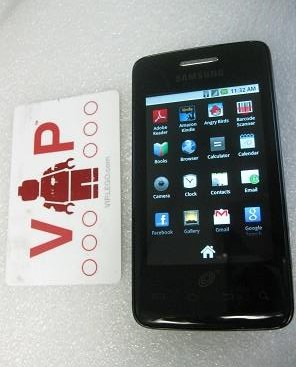
Android-Powered Samsung Galaxy Precedent!
The Straight Talk Samsung Galaxy Precedent, a no-contract Android phone, is now available with unlimited minutes, messages AND data for $45 per month. The introduction of this phone was an event and raised some interesting questions due to past limitations in prepaid phones?

Questions such as . . . Would you get access to all the cool apps? Could you make the most of the 3G and WiFi capability? What about the touchscreen, 2 MP camera, and music player. Would the GPS navigation really work?

We'll get to all that, but one of the best things about getting an Android phone on this plan is . . . the plan.

Unlimited Minutes Messages Data

$45 per month Straight Talk Plan

The Straight Talk Samsung Galaxy Precedent requires the $45 monthly plan which includes unlimited voice minutes, messages and data. While you may have hoped to use it with the $30 plan, the reality is that if you like using apps, surfing the web and keeping up with Facebook, then the $30 plan probably wouldn’t have been enough for you anyway.

Still $45 per month for a plan which includes unlimited data is a really good deal because unlimited data isn’t even currently available from any AT&T or Verizon contract plan.

Straight Talk was able to provide this by arranging . . .

Coverage on the Sprint Network

Sprint 3G network

Coverage for the Straight Talk Samsung Galaxy Precedent is provided by the Sprint Network. Sprint’s network is not quite as extensive as the Verizon and AT&T networks, so you may want to make sure that Sprint has good coverage in your area before you get this phone. If you look at the coverage map on Straight Talk's site, you may be a little taken aback, but that maps just tells you whether the phone is available for purchase and activation.

To find out the coverage area for actually using the phone, you get a better idea by checking the coverage on Sprint's site. There you can see both the voice and 3G data coverage down to the street level. You might want to check out the locations where you'll be spending most of your time, such as your home, work or school.

Android Apps and Games

You’re getting this phone so you can run Android apps and Games so you may want to know what you can install. The Straight Talk Samsung Galaxy Precedent arrives with version 2.2 of the Android operating system installed. I’ve found that you can install most of the apps and games available.

Install top Apps

Nielsen published a list of the top 20 Android apps based on user-research. I took a look and saw that about a third of those were pre-installed on this phone, and I was able to find and install the rest. All of them installed fine on this Straight Talk Android phone. Only the Barcode Scanner app (# x on the Nielsen list) didn’t seem to work properly on this phone – I couldn't get it to recognize any bar codes - I’m not sure why. I was able to install a QR-code reader however that works fine. Everything else from the Kindle to Pandora to the Weather Channel worked.

. . . and Games

Many of the most popular Android apps are, of course, actually games. There are tons of games to choose from. I installed the standard Angry Birds and Angry Birds Rio games just to see that everything was working fine. After finding the apps, it took just a few moments before I was catapulting those birds at the pigs.

After a fine round of runnings apps or games you might want to take a break and . . .

One Caveat

Note apps do crash and games do freeze from time to time. When that's about the happen, the phone tends to vibrate a couple of times before the app goes down. Not to worry, you can just restart it. If that's a big issue with you, you may want to try the LG Optimus Q.

Listen to Music

The music player on the Straight Talk Samsung Galaxy Precedent almost gets lost amongst all the other great features, but it’s there. You can listen to your favorite songs on the built-in music player. You can organize your favorites by artists, albums, songs and playlists. These songs are stored on the SD card.

If you want to listen to music online instead, you can download separate music apps such as the (free) Pandora app or the (paid) Napster app.

Watch YouTube Videos

The YouTube app is pre-installed on the Straight Talk Samsung Galaxy Precedent and allows you to watch YouTube videos. Videos play pretty smoothly though if the signal is weak, they can take a while to get to the point where they play nicely. It's even better if you have access to a WiFi network.

Record and Upload to Video

Not only can you watch videos, but you can also upload the videos you take directly to YouTube using the YouTube app on the Straight Talk Samsung Galaxy Precedent. This is not your only option, however. There are other apps you can download that let you do this as well such as SocialCam.

These Android apps are optimally designed for sharing, so you may want to be careful about what you upload. Once it's on the internet, you can’t really get it back.

Of course, you don’t have to just take videos, you can take photographs with the . . .

Two Megapixel Camera

raptor red-tailed hawk taken with Samsung Galaxy Precedent

Grab a new Straight Talk Phone and Get Free Shipping!

The Straight Talk Samsung Galaxy Precedent has a two megapixel camera. This is not the best camera available on a Straight Talk smart phone (the Optimus q has a 3.2 MP camera and the Nokia E5 has a 5 MP camera) but it’s good enough for most snapshots. If you enable the location features on the phone, then that is also recorded.

I tried the camera out recently taking the kids to a couple of festivals. The first was the National Book Festival in Washington DC. One of the exhibits there was a recreation of the Magic School Bus. While holding a book festival bag and a dog on the leash on one hand, I managed to take some pretty good pics with the phone on my other hand. The second was the fall festival at a local wildlife refuge. Someone from a raptor rescue group brought along a red-tailed hawk.

Location Info

If you enable location-gathering in your settings, you’ll also store where the photo was taken down to the street level. For example, I took the picture below on a family visit to a farm in Virginia:

flowers at hollin farms taken with Samsung Galaxy Precedent

The phone captured the location as "Snowden Rd, Virginia".

Once you take your pics, you can share them.

Share on Facebook

The Facebook (Android) app works well on the Straight Talk Samsung Galaxy Precedent. In fact, if you haven’t tried it yet, you may find that you prefer checking out Facebook on your phone rather than on the computer. It feels less cluttered and more immediate when you see the updates coming on your phone.

Upload Photos Directly to FB

There’s a camera icon at the top left of the home screen. When you touch that you can upload photos from your gallery and take a new one with the camera for immediate upload.

Of course you’re not limited to FB. Many of the other popular sites also have Android apps that you can install if you want to or just access the sites themselves.

Full HTML Browser

The full HTML web browser allows you to check out pretty much any site on the internet. There is a default homepage that’s pretty much the same across all Straight Talk/Tracfone/Net10 handsets, but you can reset the default home page in your settings to whatever URL you want or even leave it blank.

Gravity Sensor/Accelerometer

The browser uses the gravity sensor to orient the screen no matter which way you’re holding the phone. You can use a pinching or spreading action with your fingers to zoom in and out on the page so you can even read pages that are not laid out well for mobile browsers.

But no Flash

The only drawback seems to be that you can’t view Flash animation. There is an Android Flash app by Adobe, but it is only compatible with a small number of phones, and this is not one of them. I tried downloading a third party flash viewer that came up first in the search results in the Android Marketplace, but it was a piece of junk.

Practically, this means kids can't play the Flash games on sites like PBS Kids or see sites that use Flash-based video players.

Update

Even Adobe has announced they're abandoning Flash for Mobile devices.

Email and Gmail

The email and Gmail apps work very well. It’s easy to get started. You just need your email and password for popular services like Yahoo! Mail. You can install other email accounts including your work email on your Straight Talk Samsung Galaxy Precedent as long as you know the incoming and outgoing server settings. You can schedule how often to check email. Both these apps are hooked into the notification system, and give a small beep when there’s new email available. Don’t worry, you can turn this off if you want.

GPS and Location based Services

The Straight Talk Samsung Galaxy Precedent has a GPS receiver which enables location-based services and apps. This lets you do lots of cool things. For example, as mentioned above, you can store when and where your pictures were taken.

Google Maps

The Google maps application can map and give you directions, and now with the phone’s location feature, it knows your starting point. But wait, there’s more. You don’t just get directions, you also get navigation.

GPS Navigation

Once you get a set of directions, you can click on “Navigate” on your Straight Talk Samsung Galaxy Precedent to get spoken turn-by-turn directions just like a normal GPS. This feature is presented as “beta” so there might be a few glitches, so you do need to be on the alert for that. However, I haven’t had any problems with it so far. This feature works really well with the Google Places app. The navigation voice sound very computer-generated, but hey, it gets you there.

I especially like the integration with the voice search. So you can say the name of the place you want to go to. The search will bring up the location and then you can navigate to it. This is actually an advantage over my clunky old car GPS.

Google Places

Using Google Places on your Straight Talk Samsung Galaxy Precedent lets you locate nearby restaurants, coffee shops and other local places of business, and once you find them, you can use the GPS navigation feature to get spoken directions there. While this is useful in your cars, it’s really useful if you’re walking around in the city in broad daylight, because you don’t have to worry about trying to ready the screen in the bright sun.

Although, I guess it will mark you as an out-of-towner.

Disadvantages

So as you can tell, the Straight Talk Samsung Galaxy Precedent is really a great phone, but are there any disadvantages?

No Physical QWERTY Keyboard.

The virtual QWERTY keyboard works great, but if you’re a heavy texter, you might prefer a phone with a physical keyboard. In that case, if you still want to use make use of Straight Talk’s unlimited plan which includes unlimited data, you should consider one of the LG Optimus Q or one of the Nokia smartphones they offer. The Nokia phones also run apps, but they're from the Nokia OVI app store.

Sell your Soul

Just kidding. Actually, to take full advantage of all the features of the Straight Talk Samsung Galaxy Precedent, you need to create a Google account. This does probably mean sharing some info with Google, though I suppose you can create a separate account just for this phone if you want. If you're fanatical about sharing you might want to think it over. Otherwise . . .

Manual and Tutorial

Quick Reference

The phone itself comes with a quick reference guide. However there's more extensive info available online:

Manual

You can download the Samsung Galaxy Precedent Manual (pdf) here. This is a fairly complete manual and should come in handy.

Online Interactive Tutorials

There's also an online tutorials that show you how to perform many of the common tasks on this phone.

Get One?

If you’re interested in getting an Android smart phone but want to avoid expensive monthly plans, then the Android Powered Samsung Galaxy Precedent is a great deal and worth checking out.

Got One?

Already got one? Great, tell us about it!

Your Samsung Galaxy Precedent Reviews and Questions

Share your opinions and questions about this phone!

Enter Your Title

What Other Visitors Have Said

Click below to see contributions from other visitors to this page...

Transfer music from SD card to SD card for Galaxy Precedent   Not rated yet
I got the Samsung Galaxy Precedent Android and I got two sd cards with diff music on each and i was wondering if there's a way to copy the music to the ...

My fingers are too big - Samsung Galaxy Precedent  Not rated yet
Just got the phone, couple issues so far. The keyboard is much smaller than what I'm used to, which is the iPhone, but what can I expect for only 45 dollars ...

mobiScan QR code scanner works great on Samsung Galaxy Precedent  Not rated yet
After having trouble with using some QR code scanner app on the Samsung Galaxy Precedent, I found one that works great. It's called the mobiScan QR , and ...

Transfer Music and Photos on Galaxy Precedent via USB cable  Not rated yet
You can use a USB data cable to transfer photos, music etc. between your Samsung Galaxy Precedent and your computer. You don't even have to get a separate ...

Wondering about checking in on Facebook with Samsung Galaxy Precedent  Not rated yet
Q: Can you check in on Facebook (using place)?
A: Yes, you can check in on Facebook on the Samsung Galaxy Precedent phone. You may need to have either ...

Download photos from MMS messages from Samsung Galaxy Precedent  Not rated yet
So you've picture message on your Samsung Galaxy Precedent. It looks pretty cool so you and want to download it. You click on the photo and ... nothing....

Samsung Galaxy Precedent - Actual Size, Weight and Battery Life  Not rated yet
Here's the actual size weight and battery life for the Samsung Galaxy Precedent. I went ahead and actually measured these myself using a ruler and weighing ...

Samsung Galaxy Precedent Skins and Cases  Not rated yet
It's still not easy to find Samsung Galaxy Precedent skins and cases except at Amazon. It's only been about a month since the Android phone has been ...

Does the samsung galaxy precedent have a sim card?  Not rated yet
Q: Does the android-powered samsung galaxy precedent have a slot for a sim card?
A: No. This is a CDMA phone that runs on the Sprint network, so there'...

Return to the Straight Talk Unlimited page.

Return to the Straight Talk Smart Phone page.

Return to the Best Prepaid Cell Phone Plans home page.


Privacy Policy Send Feedback About this Site


Get Triple Minutes for Life with the LG800G!