Tracfone Samsung T301g Slider Phone Review
Basic Camera, Bluetooth and Easy to Read Screen
The Tracfone Samsung T301G is a good prepaid cell phone if you want a
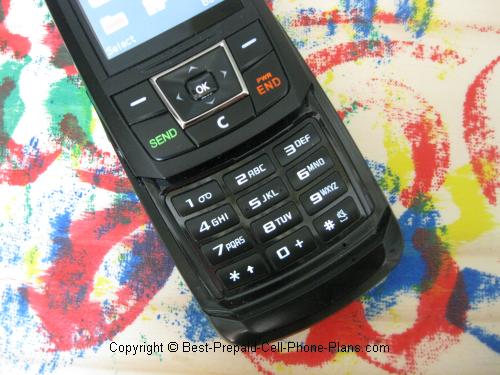
- slider phone with
- camera,
- Bluetooth headset compatibility,
- money-saving "double-minutes-for-life" feature,
- and costs just $19.99 (plus a 60 minute card or accessory kit)
I’ve been testing it for a couple of months now, and I think it’s a great deal if you want a nice phone and inexpensive minutes.
Note: This phone is usually no longer available. So use this review more for reference purposes.
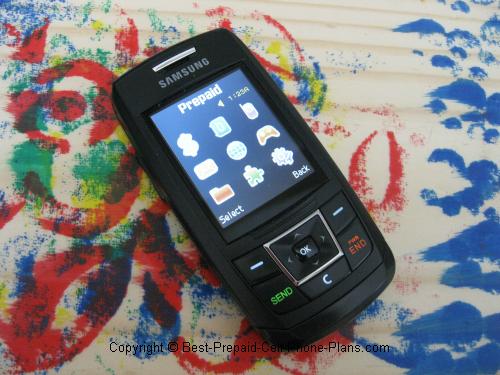
T301g - Main Features
Slightly Bigger screen
When Samsung released the T301g a couple of years ago, they put in a slightly bigger screen (than on the W376g). This made it a little easier to do everything else with the phone.
VGA Camera
The basic VGA camera on the T301G is good enough for small group snapshots for sharing on the phone or via email. It does have some nice features for editing and special effects as you can see in this video.
Bluetooth for Headsets
The Samsung T301g is compatible with Bluetooth headsets but not for file
transfer. Current models like the LG 440g or the LG 500g do allow you to transfer files and photos.
Contacts
You can store up to 100 contacts. That’s not a lot, but you can at least store all of someone’s contact info such as their home, mobile, office phone and fax numbers, and email address. You can assign a photo as their ID, their ringtone. You can assign contacts to groups. Then, you can send text or photos to everyone in a group at once, though this will cost you more airtime.
Calendar
If you’re the organized type, and who doesn’t need to be these days, you can choose to store your appointments and reminders and tasks on the T301G. You cannot sync this calendar, however, so if you choose this one, you need to have it with you for it to work.
Alarm Clock
The alarm clock could end up as the feature you use the most. The default sound of the alarm is not only pleasant but starts out softly and then gets louder. This way you don’t get jolted awake. I set mine to go off about 10 minutes before my clock radio. I wake up to the alarm on the T301g and then shut off the alarm on the clock radio.
Ringtones
The phone comes with a nice assortment of ringtones, including a few that sound “hip”. You be the judge. The default ringtone, which is great as an alarm, isn’t so great as a ringtone because it starts out softly, so it can be awhile before you notice it ringing. You can just choose another sound as your ringtone.
If you like fiddling around with your phone sometimes (I’ve learned to like it, while creating this site), there are a whole host of nice features available. Some of these are available on other Tracfone models as well, but, as I mentioned, the larger screen helps.
Calculators and Converters
The calculator makes it easy to count all your money. You can use it make sure you’re getting a good deal or not jumping into a bad one. This could easily be worth the cost of the phone. Along with a calculator there’s a separate tip calculator which is able to split checks. The converter does currency, weights and measures. So if you’re visiting the USA, you could pick up one of these and check how many liters is a gallon and how many dollars make a pound.
When you’re busy with a task with deadlines, you could make use of the . . .
Stopwatch and Timer
You can use the stopwatch to time various tasks. This is commonly available on most Tracfone models, but relatively uncommon is the countdown timer. With the two functions, you can time your laps or make that perfect three-minute egg for your power breakfast.
And if you have a presentation to make that morning, you can quickly turn on the phone’s . . . Voice Recorder
The voice recorder is great for practicing speeches and presentations or even practicing interview questions. You can even record the actual thing if you want to analyze how it went later on.
You can easily have some fun with the voice recorder, but if not there are a couple of games available as well.
Games
Sudoku and Jump Boy are installed on the Samsung T301G. I have some luck with Sudoku, although it’s more of a challenge than doing it on paper. On the other hand, my six-year old figured out how to play Jump Boy before I did. And if that’s not enough to keep you amused, you can always try download some for a fee.
Download Games
There are many games you can download from Tracfone. You can try “ATV Off Road Fury” to “Are You Smarter Than a 5th Grader”, which you just might be since you’re playing "Fury" on the phone rather than in real life.
Download Ringtones
Similarly, you have a choice of ringtones you can download for a fee. If you don't change your ringtone all that often, it’s not that expensive in the long run.
Download Graphics
You may be happy with the wallpapers already on the phone. If not then you can download some from Tracfone or choose one of your photos. One of the included wallpaper that I like is a plant with long green leaves coming out of a barely visible white pot.
More Web Services
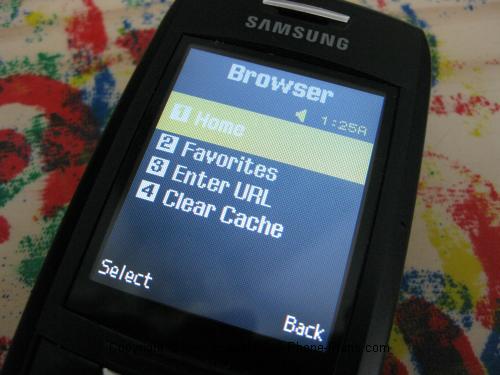
You can check the weather and get the latest sports and news stories via the web browser.
Weather
Checking the weather can actually be useful, if you want to quickly see when clothes to wear. What makes it convenient is that you can just type in the zip code. It’s a lot easier to press numbers than to go through the letter routine. Even though it cost a minute, it was quicker than waiting for the TV to get around to your area.
News and Sports
You can get the latest news and sports stories. You get not just the headlines, but the full story. For example, I checked the scores for a playoff game, and I got the complete Associated Press story. As long as you’re willing to use the airtime, it’s worth it. Again, the larger screen of the T301G comes in handy, as you can read a paragraph (or two if they’re short) at a time before scrolling. At the end of the page you have to click a “link” to go to the next page of the story. The upside down triangle format of a news story comes in especially handy here, because the first few paragraphs are usually enough to know what happened.
Overall, using the web info is not a great experience, but it is better than expected.
Keypad Locked by Default
It’s very easy to accidentally press the web browser button, so, by default the keypad of the Samsung T301G is locked but with no password. Before you use the phone you have to press the Unlock and then OK options. It does add a second or so delay, but save your airtime from being wasted.
Lightweight and Long Lasting
Despite the larger screen, this Samsung slider phone still weighs less than 3 ounces and has rated standby time of 14 days. You won’t get that, especially if you use the alarm like I do, but you’ll still be able to go awhile before you need to recharge.
Accessories
A generic accessory kit was available that included a portable car charger, a (wired) handsfree headset and a carrying pouch or case.
Manual and More Info
Here's the official user guide and interactive tutorial from Tracfone.
Is it For You?
Again, if you’re looking for a nice slider phone compatible with a prepaid plan, the Tracfone Samsung T301G cell phone is a great find. You get a camera, Bluetooth headset compatibility, and many other features that are easier to use on its larger screen.
If you’ve owned an old basic Tracfone before, this is still a nice improvement though there are now fancier options available, such as touchscreen phones and phones with QWERTY keyboards.
If you’re switching from a cell phone with a long-term contract, you will save money and get a nice easy to use phone with a lot of useful features.
Got One?
Great, tell us about it!
Your Samsung T301G Reviews
Share your opinion about this phone!
What Other Visitors Have Said
Click below to see contributions from other visitors to this page...
Send multiple pictures 
Is it possible to send multiple pictures? If so, could you tell me how this is done? All help would be appreciated. Thank you.
---------------
Hi …
Sound and accessories
I just bought this phone at K Mart for $19.99. Does this mean it is a reconditioned phone or a brand new one without accessories?
Also, I have not …
Compared to LG 420g?
I plan to order either this or a LG 420g. I would appreciate any information that you can provide to help me decide.
Are there any significant differences …
Wonderful inexpensive phone
This phone is wonderful ..... I was using T-Mobile ... No problems ....good phones, good service ... all good , except the price. $39.00 per month BUT …
How to change increasing ringtone to steady
Hi, I just wanted to ask you about the Phone I just bought. When my phone rings I notice that the first ring is low volume after the second ring on its …
How many cents per minute?
I am going to think about getting this phone, but how many cents per minute?
______________________________
Hi,
Good question. The answer depends …
Reboot to Set the Date and Time
Hi. Can anyone help? I can get to the proper screen but it does not accept any changes. It just keep flipping between date and time formats, but doesn't …
Browser key
The browser is located on the right key and as soon as you touch it you are charged 1/2 minute. I have tried to eliminate the browser key off main screen …
Awesome reception - don't cover antenna
I was going to get a contract phone, but then I realized how much it would cost. I started looking into Tracfone. I saw the T301G and started reading reviews …
Not happy with it
Caution-
The display went bad, got another phone, same model number, but SIM card is "Incompatible" !
All my contacts are lost!
Not happy with reception …
I love my Samsung T301G
My absolute favorite feature of the Samsung T301g is the larger screen. It makes it so much easier to see the text on the screen, and makes it easier to …
Does this come with speaker option? 
Q: Does this phone come with speaker option?
A: Yes, this phone comes with a speaker phone capability. The option appears once a call is in progress. …
Camera Resolution Not rated yet
How do I change the resolution on the picture? Somehow I got the resolution to go from 320X240 to 128x160 & can't get it back. Now I have a skinny rectangular …
Can't unlock phone screen! Not rated yet
I bought this phone for my son and it's great except for some reason when he charged it today, it showed on the screen that the phone is locked and needs …
Frustrated - Can't connect to PC via Bluetooth Not rated yet
Cannot get the phone to find my PC with Bluetooth. Likewise, my PC can't seem to find it. Any suggestions? Thanks
------------
Hi,
Unfortunately, …
Having trouble sending pictures Not rated yet
Having trouble sending pictures. Haven't got info Service Guide.
____________
Michael,
On your phone you can go to Menu -> Messages -> Create a …
Can you go on web sites like espn Not rated yet
Can you go on web sites like espn or no?
-----------------
Jon,
You can't access ESPN, but you can access Yahoo! I've added a screenshot of link …