How to Activate a Kajeet Phone
Update: Kajeet No Longer Sells Phones to Consumer
Kajeet no longer sells phones or offers cell phone service. They now concentrate on provide safe internet for schools. So the directions below are for reference only.
It’s pretty easy to activate a Kajeet phone, but I thought it might be useful for parents to see exactly what’s required of them.
Once your phone arrives, look in the battery compartment and write down the ESN/IMEI number. This is the number after the "DEC" in the picture below.
Update 2013: Bring your own Device
This procedure has changed slightly with the option to bring your own Sprint-based device. The steps below illustrate what you have to do with one of their own phones.
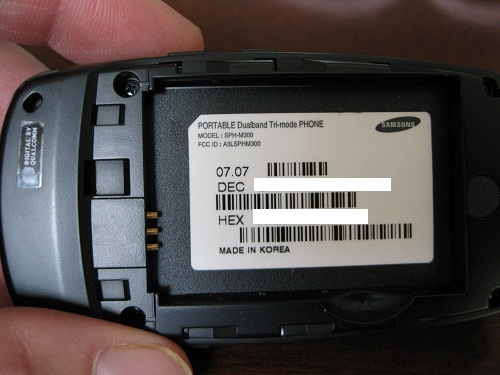
Then insert the battery and charge the phone. Once the phone is charged, you are ready to go online and active your phone. You start with Step 1 where you choose the option to activate a new phone.
Step 1 Get Started
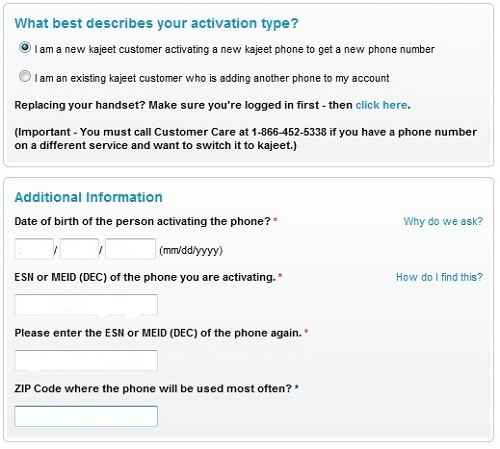
You have to put in the date of birth and zip code along with the number you write down before.
Step 2 Choose Your Plan
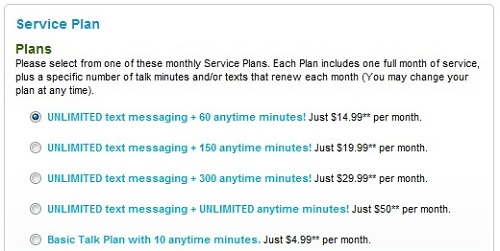
(Note: these plans have changed slightly since these screenshots were made, but the process is the same.)
Next, you have to choose your plan. One of the best choices is the $14.99 plan which allows for unlimited texting and also give you 60 voice minutes a month. This way, you child can call if it’s necessary, otherwise can simply always send you a short, simple text to tell you that he or she has arrived at the destination or will be late coming home.
If you know your child will need more voice minutes, there are further options to choose from. There’s also a basic option for just trying out the service. That’s what I chose for the purpose of this review.
Step 3 Parent and Child Accounts
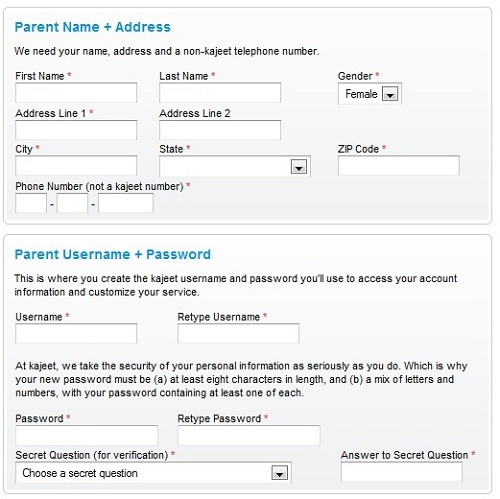
Parent Account
Now you have to enter in some of your personal info and also create a user account. This account will manage the child’s Kajeet wallet as well as have access to the parental controls.
Referral Bonus
If you know someone else who has a Kajeet phone, you can enter their name their so that they can get a referral bonus.
You can choose whether you want to receive promotional emails from Kajeet. These are the preferences for yourself, not your child. I would normally choose “No” here, but I chose yes, simply to see if I receive anything worth writing about for this site.

Child Account
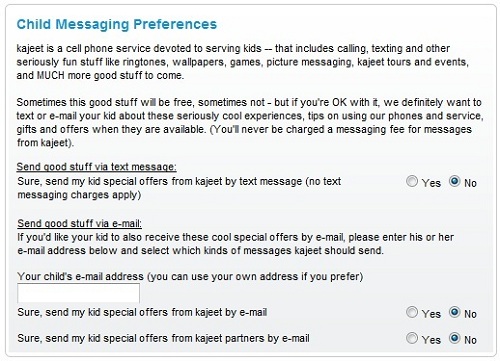
Now you create your child’s account. You have to enter their full name and date of birth, and you have to choose their messaging preferences. I would definitely choose NO to these questions in the beginning. After they have used the phone for a while and learned the wallet system, you can allow them to receive these offers.
You also have to designate whether the phone is for you or your child. (Actually, the plans are pretty good, so you might even consider getting one for yourself later on.)

Step 4 Done
And then you’re done. Now you just have to activate the Kajeet phone itself with the activation code they give you. The code is in the format:
##some numbers# This basically unlocks the phone so you can enter your assigned phone number and enter your MSID number. The MSID number also looks like a phone number so just be careful not to get them mixed up as I almost did.
Step 5 Summary

So that’s the process in (perhaps too much) detail.